How To: Request a Default Job Change
When an employee needs a change to their default job, managers can submit that request in the system.

Note: If your company is using Position Management, see How To: Request to Change Primary Position & Rate.
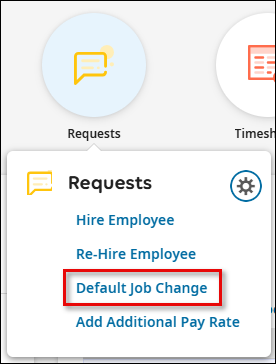
From the Home dashboard, hover over the Requests icon and select Default Job Change.
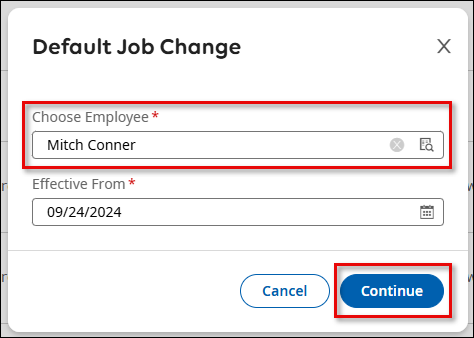
Click Start to begin your request. Select the Employee who is changing jobs and click Continue.
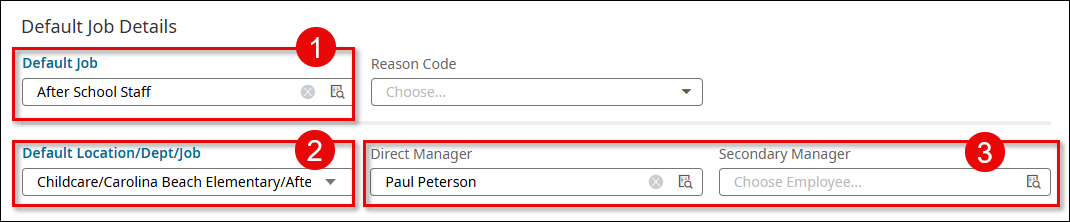
Enter the information for the employee's new default job.
1) Assign the new Default Job (this is the general job title).
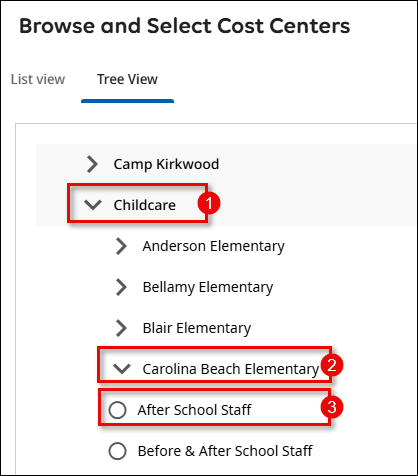
2) Assign the new Default Location/Department/Job (this is the cost center specific to the location and department where the employee will be working).
3) Assign the new Manager/s (if applicable).
When selecting the new Default Location/Department/Job, be sure to drill all the way down to the job/position level.
Once you have updated all necessary fields, click Submit to send your request for approval.
Popular Articles
How To: Add Workflow Delegation for Backup Approval
If a manager/approver is out of the office for a period of time, Workflow Delegation can be set up to assign a different manager to handle approvals during their absence. Delegations can be add by the employee prior to their absence or by the Admin ...How To: Enter a Manual Check
Enter the Payroll Prep for the next scheduled payroll date Select View Pay Statements in the Add/Edit Pay Statements Payroll Prep step. Do not Initiate Payroll or Sync Time Select New Pay Statement Create a new pay statement using the Manual Pay ...How To: Submit a New Tax Withholding Form
Changes to withholding form, such as the IRS Form W-4, can be initiated directly in the system by an employee and approved by HR. Once processed, all changes will be automatically updated on the employee record and applied to the next payroll ...How To: Enroll in Benefits For Life Change Event
To enroll in benefits as the result of a life change event, such as the birth of a child, adoption, marriage, divorce, etc. select Start a new life change event on the My Benefits widget: You may also navigate to My Benefits > Enrollment > Life ...How To: Consent to Electronic Year-End Form Delivery (W2 or 1099)
To grant consent for electronic year-end forms, navigate to My Info > My Pay > Forms > W2 or 1099-NEC Click the Electronic Consent button Check the box to Receive Form W2 Electronically and confirm the update with your password Once you have ...
Related Articles
How To: Request to Change Primary Position & Rate
When an employee needs a change to their Primary Position and Rate, managers can submit that request in the system. Note: If your company is not using Position Management, see How To: Request an Employee Base Rate Change and How To: Request a Default ...How To: Request an Employee Base Rate Change
When an employee needs a change to their base pay rate, managers can submit this request directly through the system. Follow the steps below to complete this action. On the Home tab hover over the Requests icon and select Base Pay Change. If you do ...How To: Submit a Hire Request
When you are hiring a new employee, as a manager, you have the option to submit this request directly through the system. Follow the steps below to complete this action. On the Home tab hover over the Requests icon and select Hire Employee. If you do ...How To: Request an Additional Employee Pay Rate
When an employee needs an additional rate, managers can submit that request in the system. Note: If your company is using Position Management, see How To: Request to Add/Update Additional Positions. From the Home dashboard, hover over the Requests ...How To: View Employee Default Location, Department, and Position
Managers can view an employee's default Location, Department and Position in several places within the system. This article will walk you through where to view this data. On the Team Info tab of the dashboard, view the Employee Information report. ...